 SignSheet
Purchase orderApproved · 2/2
PO-2411-0087 — 24 ergonomic desk chairs
A department head signs, then finance. The amount, supplier and cost centre travel with the row and land on the signing page.
Pick a row in your approvals sheet — a PO, a quote you are confirming, an equipment handover, a job sign-off — name up to three approvers in order, and send. Each signer draws a signature on one page, no account needed, and every step is recorded with its IP address, timestamp and SHA-256 hash. One spreadsheet account covers the whole chain; nobody buys a seat.
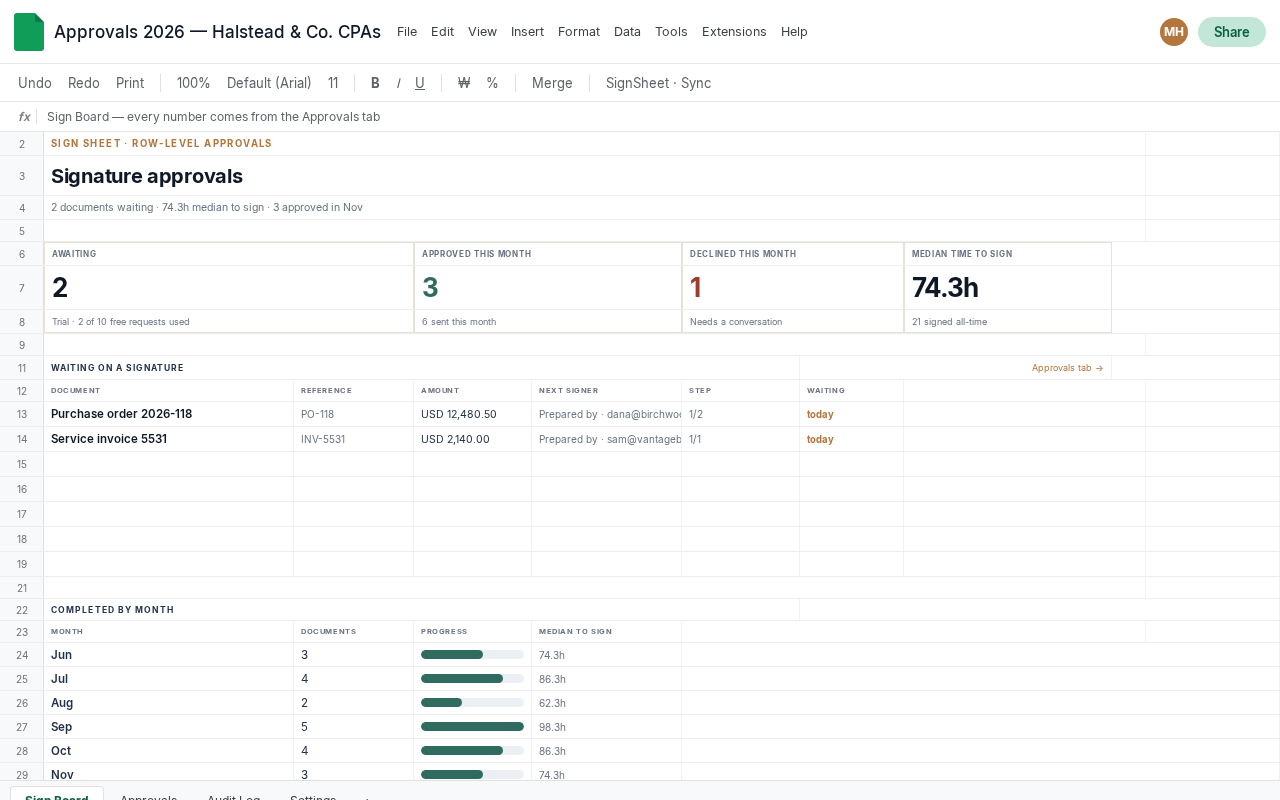
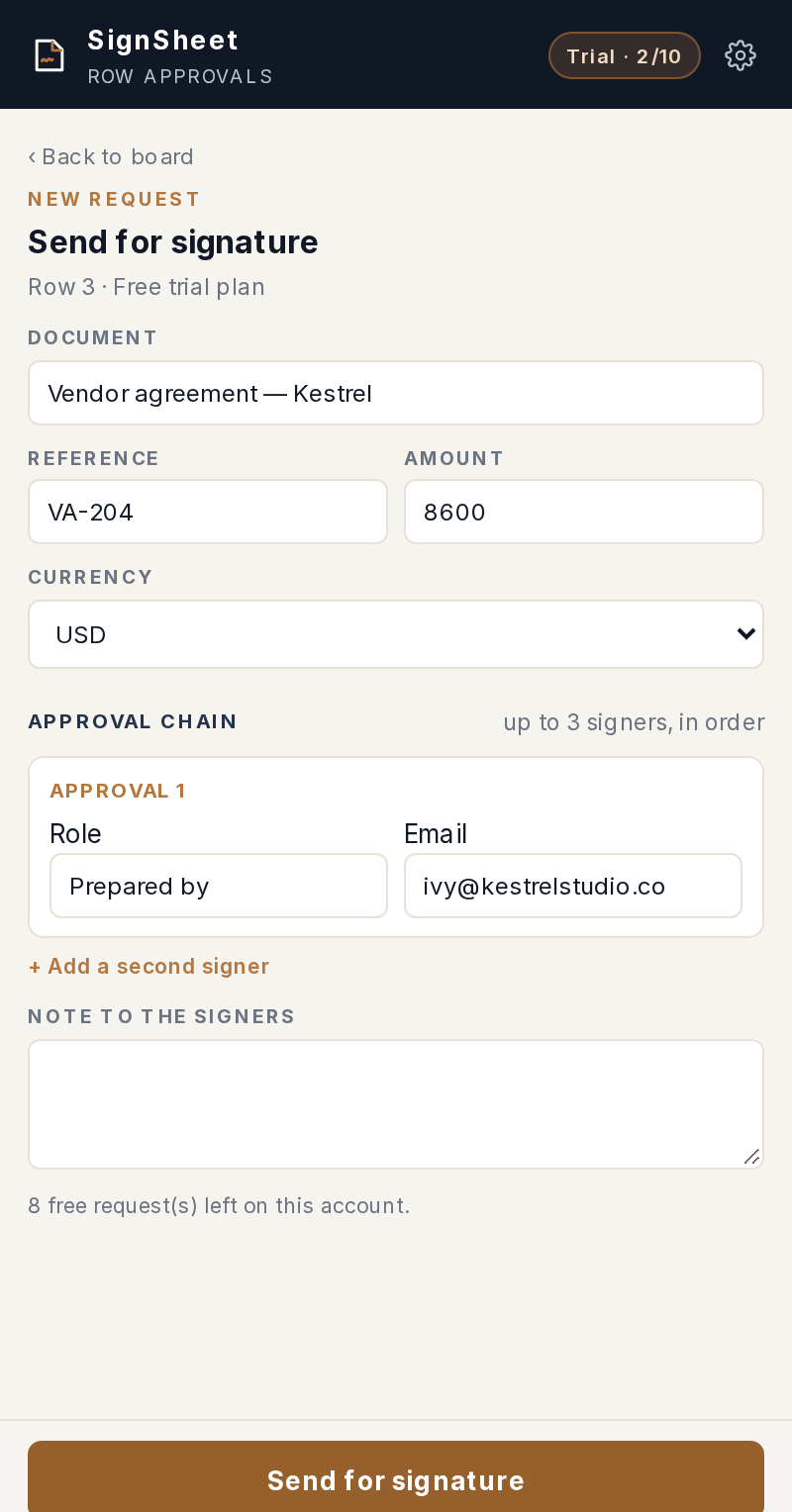
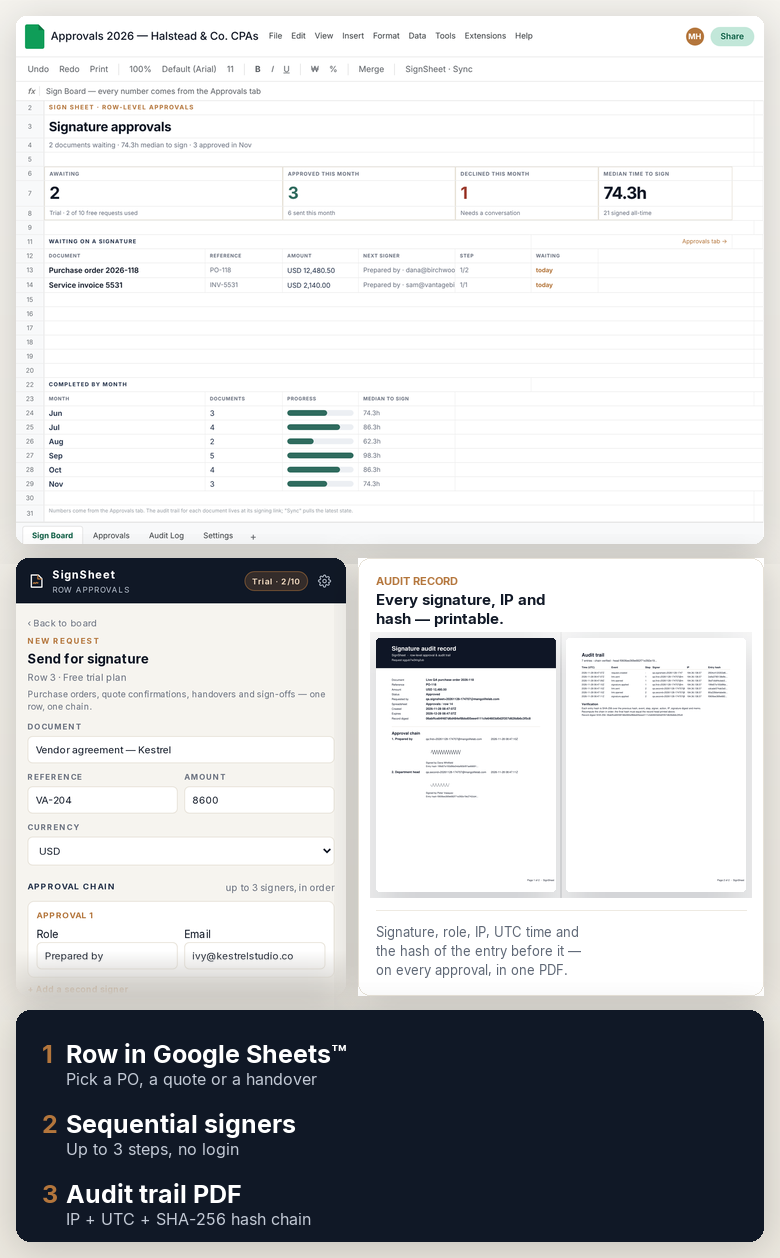
One row, two approvers, one audit PDF. The whole path is on screen and nothing is staged: this is the add-on driving the same signing service the samples below run on. No sound, no narration.
Open the demo on YouTube if the player is blocked · 0:28 · English interface
SignSheet is built for the operational approvals that live in a spreadsheet row and wait on one person's inbox — not for heavily negotiated agreements. Those belong in a dedicated contract suite; these belong in the sheet where the work already is.
A prepared order goes to the department head, then finance, before the vendor is called. Amount and reference sit on the row and on the signing page.
Confirm a supplier's quote or a change order at the price you agreed, with the version the signer saw recorded against the timestamp.
Laptops, tools, vehicles, keys: one row per handover, one signature from the person receiving it, a record for the asset file.
The client or site lead signs that the work is done, with their note, before the invoice goes out.
The plan belongs to the spreadsheet workspace. Approvers are just email addresses — no licence, no invitation, no seat to buy for the department head who signs twice a month.
Seat-priced suites charge every sender. Here the plan covers the sheet: 100, 400 or an uncapped number of documents a month.
Three sample records sit on the same signing service the add-on uses — a purchase order, an equipment handover and a supplier quote. Nothing to install and no email needed. They are read-only: the signature boxes are closed, and opening them never counts against anyone's ten free requests.
A department head signs, then finance. The amount, supplier and cost centre travel with the row and land on the signing page.
The person receiving the asset signs once, with the serial and the condition on the record for the asset file.
Three sequential approvers on one document: project lead, procurement, then the finance director.
The samples carry the names, amounts and note text of a fictional office so the records read like real ones. Each one is a sealed, read-only record: its chain is recomputed on every open, and any edit to the trail would show as broken.
A purchase order, a quote, a delivery note or an internal sign-off lives on a row. SignSheet turns that row into a signing request, then writes the outcome back to it.
The Approvals tab holds the document title, reference, amount and the signers with their roles. Select a row, press “Request a signature”.
A personal link opens a single page: the document details, the approval chain, and a canvas for a handwritten signature. Approve or decline, add a note, done.
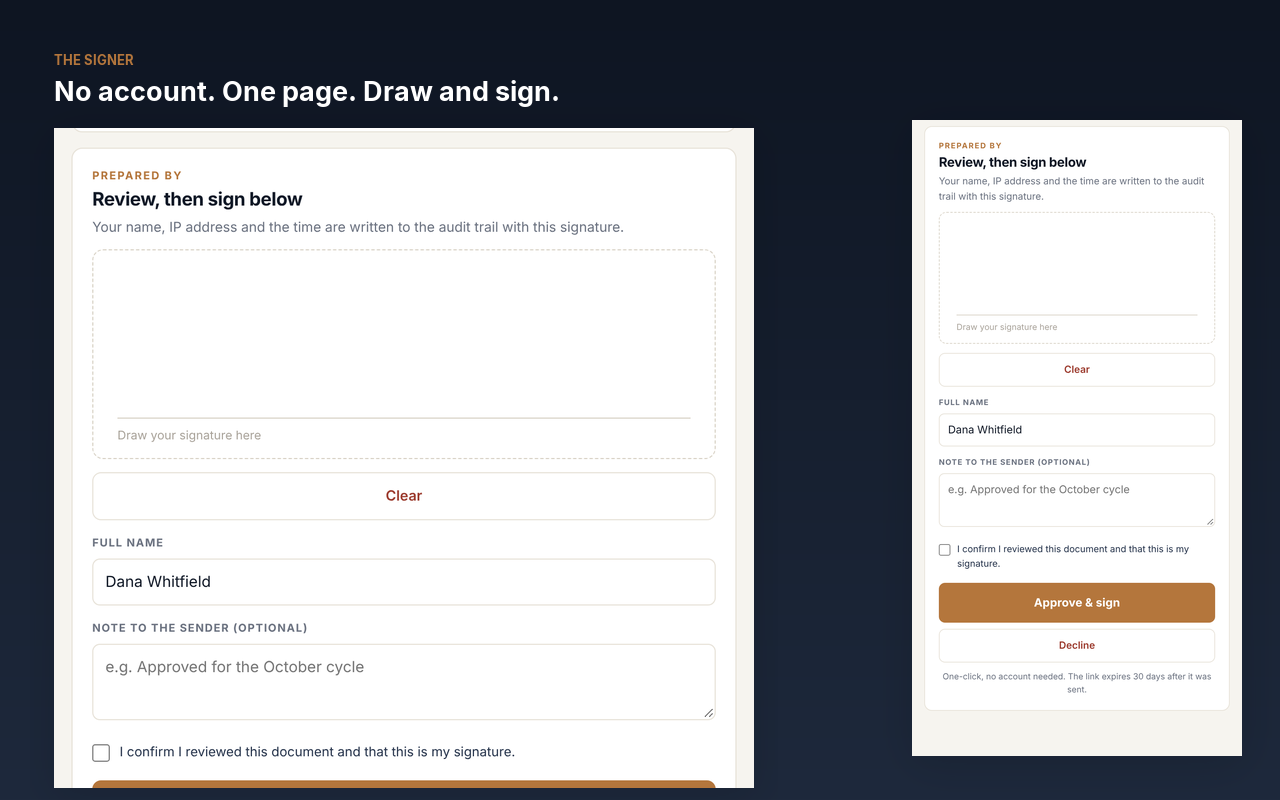
Status moves from Awaiting to Signed 1/3 to Approved or Declined. The next signer is emailed automatically, and the audit head is written to the row.
US electronic-signature practice under ESIGN and UETA turns on four things: that the signer intended to sign, that they consented to do it electronically, that the signature can be attributed to them, and that the record has not been altered since. SignSheet captures each of those signals in an append-only trail — IP address, UTC timestamp, drawn signature digest, consent checkbox and a hash chain where each entry covers the one before. It is evidence, not a legal certificate: whether it satisfies a given dispute is for your counsel to judge.
Signer name, role, email, IP address and a UTC timestamp for every signature and decline.
The record page recomputes the whole chain and says whether it still matches.
A PDF with the document details, the signature images, the full trail and the record digest.
The add-on polls the signing service and writes Approved, Declined or partial states back to the row.
Nudge the current signer with one click, or void the link so it stops accepting signatures.
Starter and Growth emails carry a small “Sent via SignSheet” line. Business removes it and uses your company name.
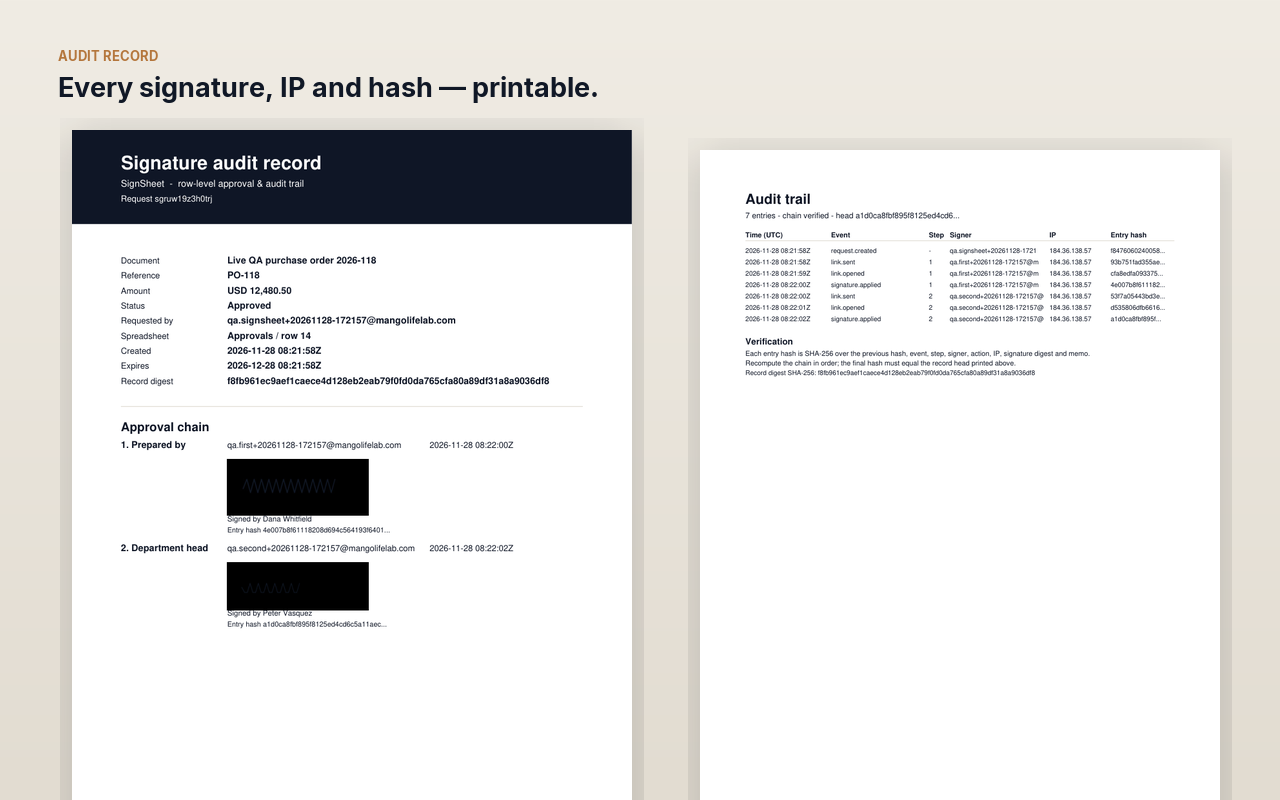
A PDF per document with the drawn signatures, the signer roles, the IP addresses, the entry hashes and a record digest. The same data is available as JSON for your own archive.
Signatures are stored with the request; the spreadsheet itself is never copied to our servers. We keep the document title, reference, amount and notes you choose to send, plus the audit entries.
Two comparisons matter. The leading Sheets signature add-on, Formesign, charges per workspace from $18 a month and advertises sequential signing. Seat-priced suites such as DocuSign list $15 to $65 per user per month, and every approver who needs to send is a seat. SignSheet prices the spreadsheet, not the people in the approval chain.
| SignSheet | Formesign (listing) | DocuSign (list) | Email + PDF | |
|---|---|---|---|---|
| Signature collected inside a sheet row | One request per row | Whole sheet becomes a form | No — separate app | No |
| Sequential approvers | Up to 3, with roles | Yes | Yes | Manual |
| Signature audit trail with IP + hash chain | Yes — PDF and JSON | Not described in the listing | Certificate of completion | No |
| Signed PDF copy | Audit record PDF | Saved to Google Drive™ | Completed PDF | Sometimes |
| White-label emails | Business plan | Not described | Branding on higher tiers | Yes |
| Status written back to the row | Approved / Signed 1/3 / Declined | Real-time progress | No — back to the app | No |
| Pricing model | Per spreadsheet workspace | Per workspace | Per user, per month | — |
| Starting price | $19 / month for 100 documents | $18 / month (listing) | $15–$65 per user / month (monthly billing) | Free |
| Free before paying | 10 requests, no card | 7-day trial (listing) | Paid from the first seat | — |
Formesign figures come from its public Marketplace listing on 28 November 2026. DocuSign figures are its published US list prices for eSignature Personal, Standard and Business Pro checked in November 2026 ($15 month-to-month, $45 and $65 per user per month); features not described there are marked as such rather than guessed.
Ten requests are free and need no card. Paid plans open with the Marketplace listing; everyone on the waitlist hears first.
Prices in US dollars, per spreadsheet workspace. Annual billing is 30% below twelve monthly payments. Cancel any time; the audit records you already generated stay available.
SignSheet is built around US evidence practice and describes the record as what it is: proof of who approved what, when and from where, chained so later changes are visible. That is not the same as a certificate that a particular statute has been satisfied, and some countries ask for a signature SignSheet does not produce. Here is the honest map.
The federal ESIGN Act (2000) and the Uniform Electronic Transactions Act, adopted in nearly every state, give legal effect to electronic records and signatures where the signer intended to sign and agreed to do business electronically. Neither prescribes one technology.
SignSheet records the four things such a review usually looks at: intent (a drawn signature with a consent checkbox), attribution (the signer's email address, role and IP), a UTC timestamp, and integrity (a SHA-256 hash chain with a record digest).
Regulation (EU) No 910/2014 recognises three levels: simple, advanced and qualified electronic signatures. Only a qualified electronic signature — created with a qualified certificate and a qualified signature creation device — carries the legal effect of a handwritten signature across the EU.
SignSheet is not a qualified trust service provider and issues no qualified certificates. What it produces is an ordinary electronic signature with an audit trail: suited to operational approvals, not to a filing that legally requires a QES.
Korea's Electronic Signature Act (전자서명법), fully amended in 2020, recognises electronic signatures broadly and no longer requires an accredited certificate — but tax, banking, real-estate and court filings keep their own rules, and some public forms still expect a certified or identity-verified signature.
Elsewhere the conditions differ again: India's IT Act, Japan's electronic signature law, Brazil's ICP-Brasil and China's Electronic Signature Law each attach their own requirements to a signature being reliable. Where a document needs a specific accredited, qualified or notarised signature, this record is not a substitute for it.
Yes. The add-on installs from the Google Workspace Marketplace on personal Gmail accounts and on Workspace domains alike. It only touches the spreadsheet it is installed in.
No. The signer opens a personal link, sees the document details and the approval chain, and draws a signature with a mouse or a finger. Nothing to install, nothing to log into.
The ten free requests are counted against your Google account, on our side as well as in the add-on. Making a copy of the sheet, reinstalling the add-on or starting a new document does not add more.
Only the document title, reference, amount, the note you write and the signers' names and email addresses — the fields shown in the signing page. The rest of the sheet is never uploaded, and signers' addresses are not shown to each other.
Operational paperwork: purchase orders, quote confirmations, equipment handovers, job completion sign-offs, internal approvals. For a negotiated agreement with redlines and a counterparty legal team, use a contract suite built for that.
The trail captures the elements those frameworks usually look at — the signer's intent, their electronic consent, attribution through email, IP and a drawn signature, and a tamper-evident record. Whether that is sufficient in a particular dispute depends on your jurisdiction and your agreement; we are not a law firm and do not give legal advice.
The add-on runs anywhere Google Sheets does. Whether the record is accepted is a local-law question: eIDAS in the EU separates simple, advanced and qualified signatures, Korea's Electronic Signature Act was fully amended in 2020, and India, Japan, Brazil and China each attach their own conditions. The section above sets out plainly what SignSheet provides and what it does not.
The licence is tied to your Google account, not the machine. Reinstalling keeps your plan and your trial count; the requests live on our servers with their audit trail.
A plan applies to one spreadsheet workspace. Team approvals within a single document — three signers in sequence — are included from Growth up. Ask about multiple workspaces when the listing opens.
Monthly plans can be cancelled at any time and stop at the end of the paid month. See the refund policy for annual plans and top-ups.
The add-on is in Marketplace review. Join the list and you will get the install link, the sample sheet and a short walkthrough the day it goes live.